What is downtime tracking software?
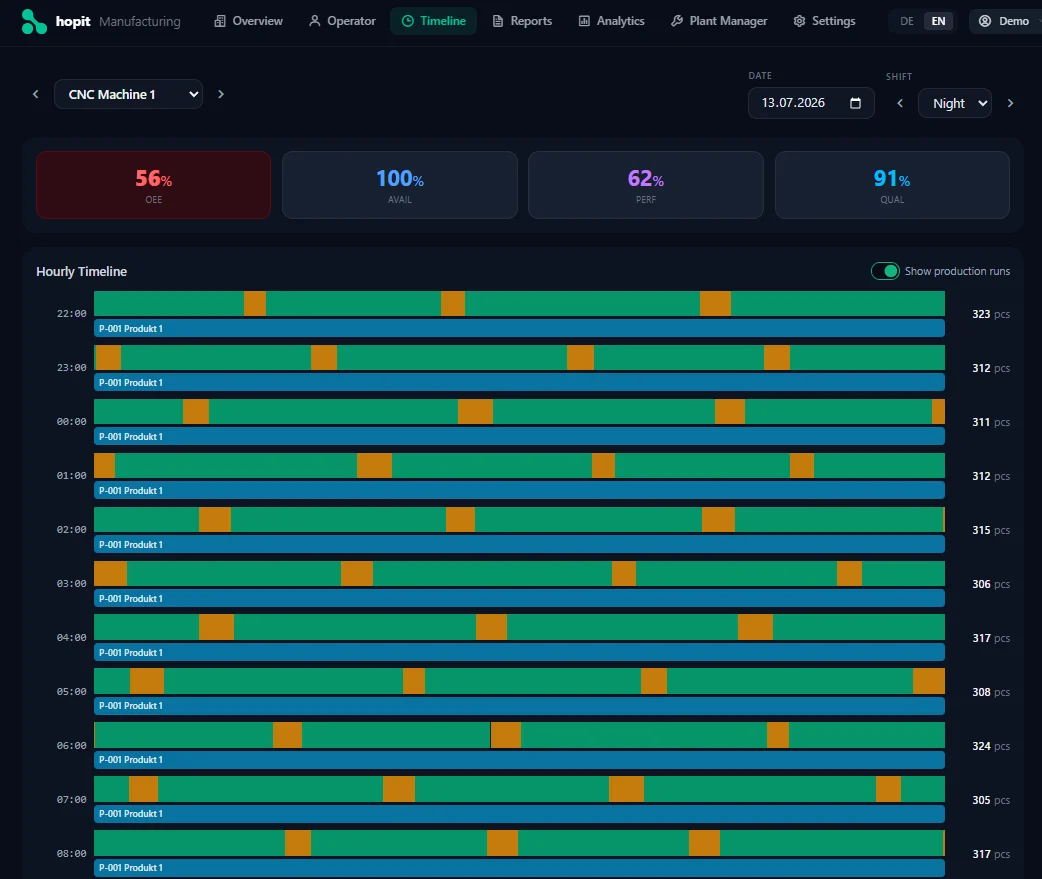
Downtime tracking software records every period in which a machine is not producing. It detects stops automatically from the machine signal, timestamps start and end to the second, asks the operator for the reason, and turns those events into reports — the top downtime reasons, downtime per shift and machine, and the Availability part of OEE.
The difference to a manual log is not convenience, it's completeness. A paper or Excel log records what operators remember at the end of the shift. Software records what actually happened.
Manual log vs. automatic downtime tracking
Manual tracking is a valid start — our free downtime tracker Excel template is built for it, and the downtime tracking guide explains how to set up reason codes. But manual logs have blind spots that no template fixes:
- Short stops disappear. Nobody writes down a 40-second jam — but twenty of them per shift add up to more lost time than the one breakdown everyone remembers.
- Durations are rounded. "About 15 minutes" in the log is often 25 on the machine.
- Reasons are reconstructed. Filled in at shift end, the reason becomes whatever is easiest to write, not what caused the stop.
- The data comes too late. By the time the log is typed up, nobody can react to it.
Which features should downtime tracking software have?
- Automatic stop detection — the machine signal marks the start and end of every stop, not a person.
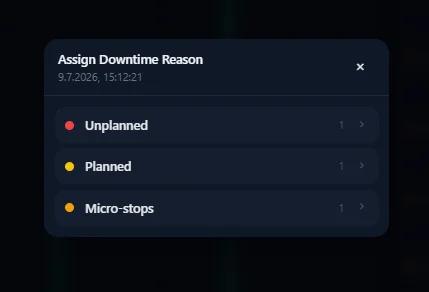
- Fast reason entry — when a machine stops, the operator picks the reason in a few taps on a tablet or panel PC. If it takes longer, it won't be done consistently.
- Configurable reason tree — your own reason codes and categories, so the data matches how your plant thinks about losses.
- Planned vs. unplanned — changeovers, cleaning and breaks separated from real breakdowns, so Availability is calculated correctly.
- Short-stop capture — a configurable minimum duration, so micro-stops are counted instead of ignored.
- Pareto analysis — the top reasons for lost time, per machine, line and shift.
- Alerts — notify maintenance or the shift lead when a machine has been down for too long.
- Connection to OEE — downtime feeds Availability directly, so every OEE dip links back to the stop that caused it.
Downtime tracking options compared
| Option | Paper / Excel log | CMMS | MES module | Dedicated software (edge/cloud) |
|---|---|---|---|---|
| What is recorded | Stops operators remember | Stops that become a work order | Depends on integration | Every stop, automatically |
| Short stops | Missed | Missed | Sometimes | Captured |
| Implementation effort | Low | Medium | High — IT project | Low to medium |
| Typical cost model | Free, but costs labour | Per user | Licence + integration | Per machine per month |
A CMMS is often mistaken for downtime tracking. It manages maintenance work orders and spare parts — it only knows about a stop when someone opens a ticket. Changeovers, material shortages and short stops never get there. Many plants use both: downtime data shows where the losses are, the CMMS organises the repair.
What does downtime tracking software cost?
Downtime modules inside an MES are usually five- to six-figure projects including licences and integration. Dedicated edge or cloud downtime tracking software is usually billed per machine per month, often without a large upfront investment — plus a manageable one-off amount per machine for the connection hardware. For a fair comparison, add the hours your team spends today keeping a manual log and typing it up.
See automatic downtime tracking live
Try the free online demo — every stop detected, every reason one tap away.
TRY THE FREE DEMOHow to choose downtime tracking software
- How are stops detected? — From the machine signal, or does someone still press a button? Only the first gives you complete data.
- Does it cover older machines? — Check for retrofit sensor support, not just modern PLC protocols. See the machine monitoring use case.
- How long does a reason take? — Test it at the machine, with gloves on. Seconds, not minutes.
- Can you adapt the reason codes? — Your categories, your language, without a change request to the vendor.
- Is OEE included? — Downtime is one third of OEE. Software that also calculates Performance and Quality saves a second system. See OEE software.
- Can you start with one machine? — A pilot first, then the line, then further sites.
hopit Manufacturing as downtime tracking software
In hopit Manufacturing, every stop is detected by the machine — connected through the hopit Edge gateway via OPC UA, Modbus, Siemens S7, Sinumerik, TwinCAT, FANUC or MQTT, or with retrofit sensors on older machines. When a machine stops, the operator is prompted for the reason and picks it in seconds. Downtime by reason, shift summaries and live OEE come out of the same data.