What is OEE software?
OEE software measures Overall Equipment Effectiveness automatically. It collects run, stop and part-count signals from each machine, calculates Availability, Performance and Quality, and shows OEE live per machine, line and shift — instead of someone reconstructing it in a spreadsheet at the end of the week.
The formula itself is simple (see how to calculate OEE). The hard part is the input data: every stop, every slow cycle and every reject has to be captured completely and consistently. That is the job OEE software takes over.
When does Excel stop being enough?
A spreadsheet is a good way to start — our free OEE dashboard template exists for exactly that. Most plants outgrow it when one of these becomes true:
- Short stops never make it into the log. Operators record the big breakdowns, but the dozens of 30-second stops per shift — often the largest hidden loss — disappear.
- OEE arrives a week late. By the time the numbers are compiled, the shift that caused the dip is long over.
- Every line calculates it differently. Different sheets, different definitions of planned downtime — and endless discussions about whose number is right.
- Someone spends hours per week copying shift reports into Excel instead of fixing the losses those reports show.
Which features should OEE software have?
- Automatic machine connection — read signals directly from the control (OPC UA, Modbus, Siemens S7) instead of relying on manual entry.
- Retrofit support — simple sensors for older machines without a digital interface, so the whole machine park is covered, not just the newest machines.
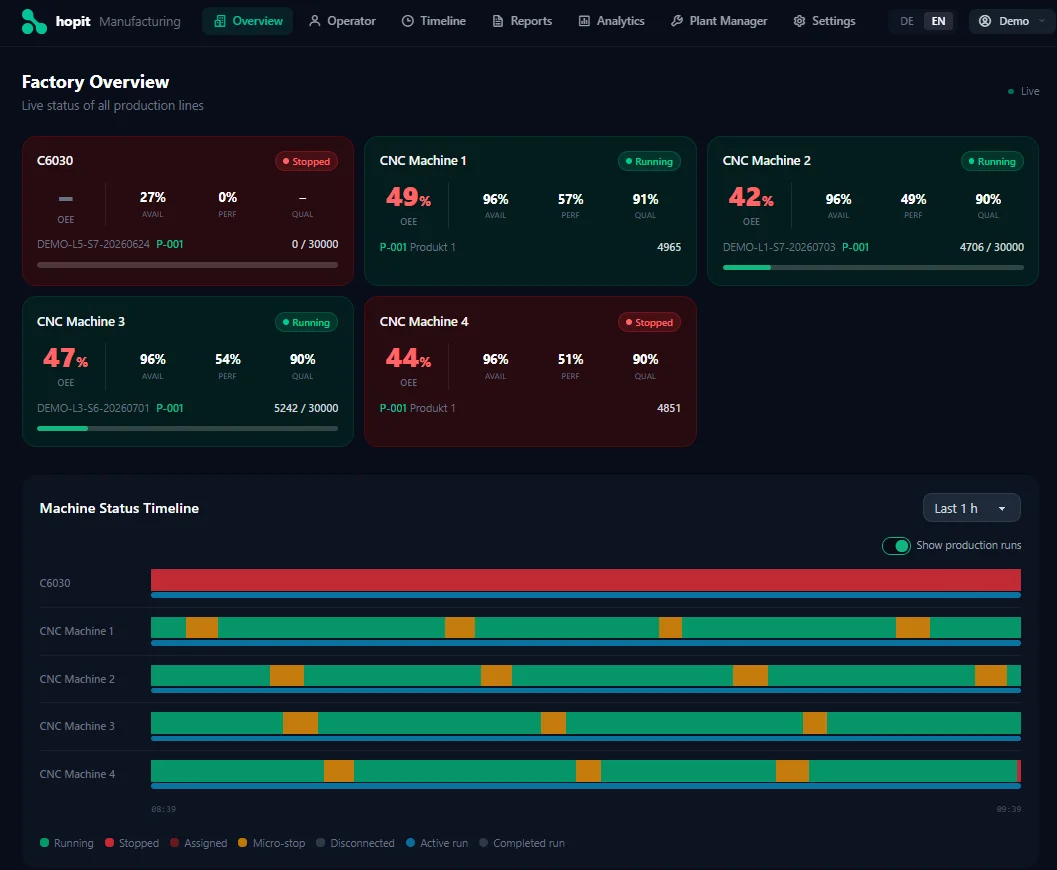
- Live OEE per machine, line and shift — Availability, Performance and Quality as they happen, not in tomorrow's report.
- Downtime reasons — every stop detected automatically, with the reason added by the operator in a few taps, so OEE losses can be traced back to causes.
- Short stops and speed losses — the losses manual logs never capture, measured against the ideal cycle time.
- One standard calculation — the same definitions for planned downtime, ideal cycle time and rejects across every line and site.
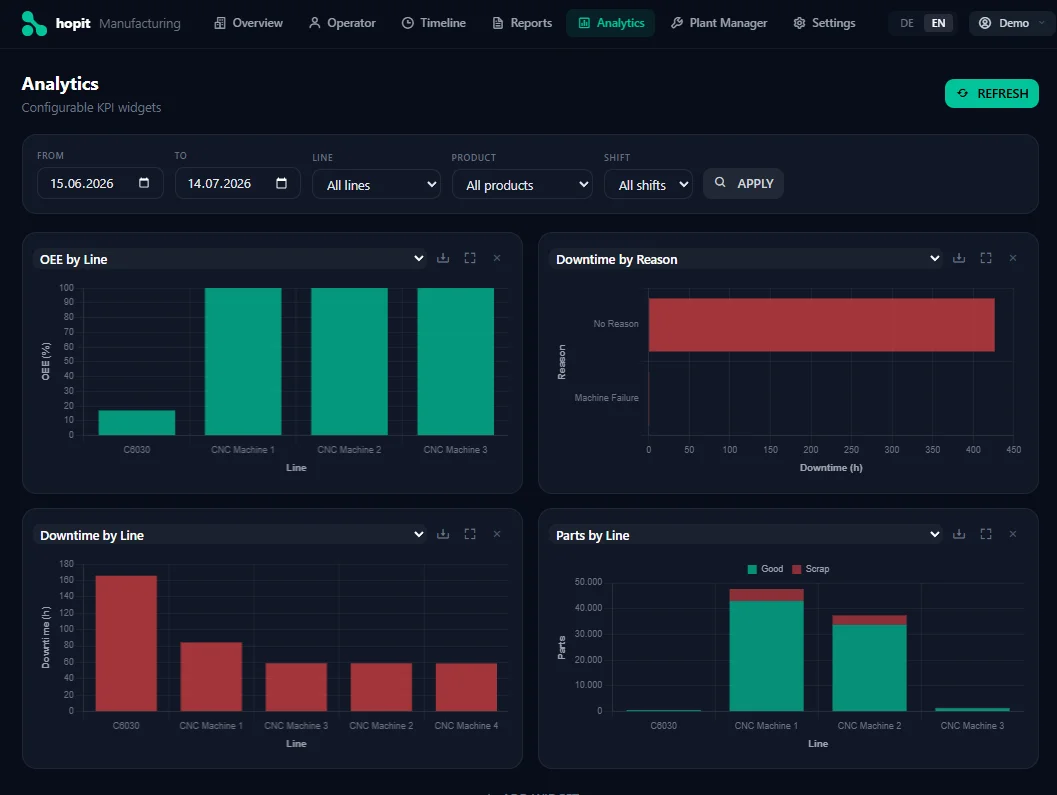
- Reports and trends — compare lines, shifts and periods; Pareto charts of the biggest losses; exports for management reviews.
- Alerts — notification when a machine stops or a threshold is crossed.
- Integration — interfaces to ERP, MES or BI tools so OEE data doesn't end up in another silo.
Types of OEE software compared
"OEE software" covers very different products. They differ mainly in how data is collected and how much effort the rollout takes:
| Type | Excel / manual | MES module | Dedicated OEE software (edge/cloud) |
|---|---|---|---|
| Data capture | Manual, from shift logs | Partly automatic, usually via PLC integration | Automatic from the first machine |
| Short stops & speed losses | Mostly invisible | Depends on integration | Captured by default |
| Implementation effort | Low | High — a dedicated IT project | Low to medium |
| Dependency on existing IT | None | High | None to low |
| Typical cost model | Free, but costs labour | Licence + integration, project price | Per machine per month |
What does OEE software cost?
Prices vary mostly with the type of system. An Excel sheet costs nothing to buy, but someone pays for it in hours every week. OEE modules inside an MES are usually five- to six-figure projects including licences, integration and consulting. Dedicated edge or cloud OEE software is usually billed per machine per month, often without a large upfront investment — plus a manageable one-off amount per machine for the connection hardware.
When comparing quotes, include the cost nobody lists: internal IT time, PLC changes, and how long it takes until the first machine delivers reliable numbers.
See OEE software running live
Try the free online demo — live OEE, downtime reasons and reports on real machine data.
TRY THE FREE DEMOHow to choose OEE software
- Does it fit your machine park? — Check that both modern controls and older machines without a digital interface are supported. More on that in the machine monitoring use case.
- How much implementation effort? — A separate IT project with an external integrator, or a system that runs without touching existing IT and PLC programs?
- Does it capture short stops? — Ask how the system detects stops and which minimum duration it records. This decides whether Performance losses become visible at all.
- How fast do operators add a reason? — If entering a stop reason takes longer than a few seconds, it won't happen consistently.
- Cloud or on-premise? — Clarify where the data lives and whether that fits your IT and compliance requirements.
- Can you start small? — Pilot on one machine, then roll out to the line and further sites without switching systems.
- Who supports you, and in which language? — Onboarding and support matter more than any single feature.
hopit Manufacturing as OEE software
hopit Manufacturing is dedicated OEE software for small and medium-sized manufacturers. Machines are connected through the hopit Edge gateway — via OPC UA, Modbus, Siemens S7, Sinumerik, TwinCAT, FANUC or MQTT, and with retrofit sensors for older machines — without changes to existing PLC programs.
- Live OEE for every machine on one factory overview, with Availability, Performance and Quality always current.
- Automatic downtime tracking — every stop is detected by the machine; operators add the reason in seconds. See downtime tracking software for how that works.
- Reports and analytics to compare lines, shifts and periods.
- Role-based access for admins, operators and managers, training included, and support in German and English across Austria, Germany and Switzerland.